AI Productivity Mouse: Context-Aware Workflow Precision
By Lars Nystrom • 10th Dec
In today's complex digital landscape, the productivity mouse has evolved from a simple pointing device to a critical interface for managing AI-assisted workflows. After years of evaluating input devices for cross-platform professionals, I've identified the best mouse for AI-assisted workflows as one that creates seamless transitions between AI tools while maintaining system-mapping consistency. The most effective solutions eliminate cognitive friction rather than adding another layer of complexity to your already demanding workflow.
The Cognitive Tax of Context Switching
I remember when I would spend my day bouncing between a Wacom tablet for design work, Windows CAD applications, and macOS creative suites. Each platform required its own mental mapping: Cmd+Z here, Ctrl+Z there, different gesture sets, and conflicting shortcut schemas. The micro-delays in switching contexts added up to hours of lost productivity each week. To start building consistent inputs across apps, use our mouse customization guide to remap buttons intelligently. Map intent to buttons; your mouse becomes muscle memory (this simple principle transformed my workflow when I finally found a device that could mirror my intentions rather than fighting against them).
Modern AI tools introduce a new layer of context switching that compounds this problem. When your AI assistant generates content in one environment, you need to copy, refine, and implement it in another, instantly breaking your flow. The best productivity mice address this by creating consistent input patterns across environments, reducing what cognitive scientists call "attention residue" (the mental drag that follows task switching).
What Makes a Truly AI-Ready Productivity Mouse
Beyond Basic Connectivity: Context-Aware Architecture
True context-aware mouse customization isn't about flashy AI features that require constant software updates, it is about intelligent workflow design that anticipates your needs before you articulate them. An effective intelligent workflow mouse should:
- Recognize application context without requiring manual switching
- Maintain consistent input logic across different operating systems
- Provide physical feedback that aligns with workflow states (e.g., subtle haptic changes when entering AI generation mode)
- Offer reliable multi-device toggles that don't introduce latency If multi-computer switching is central to your setup, compare proven picks in our multi-device mouse guide.
Many manufacturers mistakenly believe AI integration means adding voice prompts or content generation buttons. In reality, the most valuable AI content refinement peripherals are those that quietly facilitate the workflow between your existing AI tools and your primary applications.
The Friction-Hunting Framework
My systematic approach to evaluating AI tool integration mouse candidates follows these principles:
- Onboard memory as non-negotiable: If your profiles require constant driver interaction, you're adding friction rather than removing it
- Physical mapping to mental models: Each button should correspond to an intuitive action in your AI workflow
- OS-agnostic consistency: Your shortcuts should work identically across Windows, macOS, and Linux
- Predictable multi-device switching: No hunting for toggle buttons when shifting between your AI development environment and main workstation
I've abandoned more "smart" mice than I can count because their AI features introduced more complexity than they solved. The ones that stuck were those that understood: reduce cognitive load with logical inputs; your mouse should mirror intent.
Product Review: Microsoft Modern Mobile Mouse
Microsoft's Modern Mobile Mouse represents a minimalist approach to productivity that deserves attention in AI workflows. At just 5.4 ounces with dimensions of 4.22 x 2.37 x 1.01 inches, this lightweight wireless solution connects via Bluetooth without requiring a dongle (a significant advantage for those working across multiple machines). Its BlueTrack technology provides reliable tracking across virtually any surface, which matters when you're rapidly shifting between your main workstation and secondary AI development environment. If you're weighing Bluetooth against 2.4GHz or wired options for latency and stability, see our wired vs wireless mouse guide.
The metal scroll wheel provides satisfying tactile feedback during document review (a crucial element when you're refining AI-generated content that requires precise scrolling through lengthy outputs). For the knowledge worker who regularly moves between AI tools and standard office applications, the seamless Bluetooth connectivity eliminates one layer of friction in the workflow.
Where this mouse particularly shines is in its ambidextrous design and simple setup process. Unlike many productivity mice that require complex software installations, the Modern Mobile Mouse works as a plug-and-play device across Windows 8/10/11 and Mac systems. This frictionless onboarding makes it accessible for professionals who need to get up and running quickly without fighting with drivers.
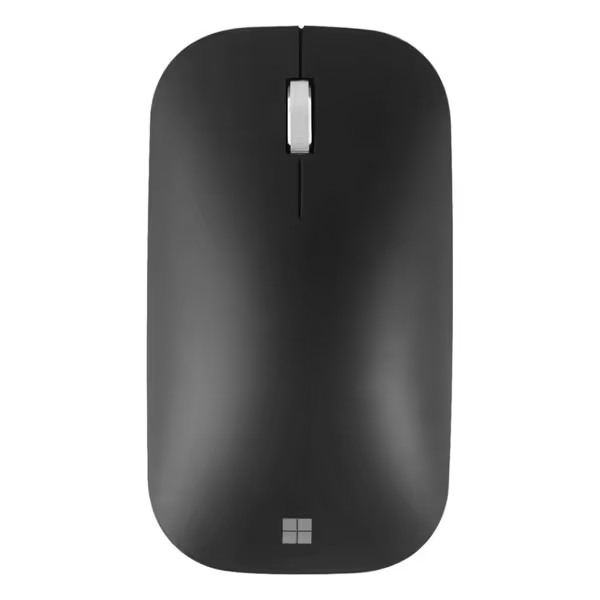
Microsoft Modern Mobile Mouse, Black
Lightweight, portable Bluetooth mouse for on-the-go precision and comfort.
$64.94
ConnectivityBluetooth (cord/dongle-free)
ConnectivityBluetooth (cord/dongle-free)
Pros
Seamless Bluetooth connectivity; easy setup
Works on virtually any surface (BlueTrack)
Cons
Mixed reports on long-term ergonomic comfort
Customers find the mouse to be well-made and easy to set up, with seamless Bluetooth connectivity and great battery life. The design is sleek and intelligently designed, and one customer notes it works perfectly with Windows 11 laptops.
Customers find the mouse to be well-made and easy to set up, with seamless Bluetooth connectivity and great battery life. The design is sleek and intelligently designed, and one customer notes it works perfectly with Windows 11 laptops.
However, it lacks programmable buttons beyond basic forward/back navigation, which limits its utility for complex AI workflows requiring custom macros. The absence of a thumb wheel or dedicated AI shortcut buttons makes it less ideal for power users who need to rapidly trigger specific AI functions. Battery life is strong (advertised as two years), but the reliance on a single AAA battery means eventual replacement, a minor annoyance compared to rechargeable alternatives.
Product Review: Apple Magic Mouse
Apple's Magic Mouse presents an interesting case study in minimalist design meeting AI workflows. With its distinctive Multi-Touch surface, it enables gesture-based navigation that can integrate with macOS's AI features like Writing Tools and Siri. The rechargeable battery (lasting approximately one month per charge) eliminates disposable battery concerns, and the woven USB-C cable provides both charging and pairing functionality.
At 8 ounces, it's noticeably heavier than the Microsoft option, which affects fatigue during extended AI content refinement sessions. The continuous scrolling surface works well for browsing through long AI-generated documents, though the lack of tactile feedback can make precise positioning challenging (a critical flaw when you're fine-tuning AI outputs that require pixel-perfect selection).

Apple Magic Mouse
Effortless Multi-Touch gestures and seamless Mac integration for daily tasks.
$67.99
0Battery Life1+ month
Battery Life1+ month
Pros
Seamless Multi-Touch gestures for intuitive navigation.
Rechargeable battery lasts over a month per charge.
Cons
Divisive design: some find it awkward for ergonomics.
Customers find the mouse works flawlessly and appreciate its sleek design and rechargeable battery that lasts a long time. Moreover, the Bluetooth connectivity is flawless and pairs instantly. However, opinions are mixed regarding ease of use and scrolling ability - while some find it easy to use with great scrolling, others find it awkward to use and report issues with scrolling. Additionally, the value for money receives mixed feedback, with some considering it well worth the price while others disagree.
Customers find the mouse works flawlessly and appreciate its sleek design and rechargeable battery that lasts a long time. Moreover, the Bluetooth connectivity is flawless and pairs instantly. However, opinions are mixed regarding ease of use and scrolling ability - while some find it easy to use with great scrolling, others find it awkward to use and report issues with scrolling. Additionally, the value for money receives mixed feedback, with some considering it well worth the price while others disagree.
Where the Magic Mouse fundamentally fails as an AI content refinement peripheral is in its complete lack of programmable buttons beyond basic gestures. For non-gaming tools that enable deep remapping and profiles, see our productivity mouse software guide. For professionals who need to trigger specific AI functions with single-button presses, this is a dealbreaker. The gesture system, while elegant, requires constant hand repositioning that disrupts workflow continuity (exactly the kind of cognitive friction we're trying to eliminate).
Additionally, its exclusive macOS compatibility creates a hard boundary for cross-platform professionals. If your AI development environment runs on Windows or Linux (as many do), you'll face constant context switching just to change mice (a workflow killer that negates any potential AI productivity gains).
System-Mapping Framework for AI Workflows
Building Your One Schema Everywhere
Having evaluated dozens of so-called "AI productivity" mice, I've developed a stepwise clarity approach to implementing a truly effective system. The goal is simple: one schema everywhere (a consistent input language that works identically regardless of which AI tool or platform you're using).
Map intent to buttons; your mouse becomes muscle memory (this transforms AI workflow from disruptive to seamless)
Here's my friction-hunting implementation framework:
Step 1: Identify Your Core AI Workflow Actions
Don't start with the mouse, start with your process. Most AI-assisted workflows involve:
- Content generation triggers
- Output refinement actions
- Cross-application movement
- Context switching
- Quality verification steps
Step 2: Physicalize Your Workflow
Assign each core action to a physical control point on your mouse:
| Workflow Action | Recommended Control | Rationale |
|---|---|---|
| Trigger AI generation | Thumb button #1 | Consistent location regardless of OS |
| Accept AI suggestion | Left click (modified) | Primary action should be most accessible |
| Reject/refine suggestion | Right click (modified) | Secondary action maintains consistency |
| Copy AI output | Dedicated copy button | Eliminates keyboard hunting during flow |
| Switch between AI tools | Thumb wheel click | Physical action creates muscle memory |
Step 3: Implement System-Mapping with Zero Driver Dependency
This is where most "AI productivity" mice fail. If your custom mappings require constant software interaction, you've introduced more friction than you've solved. A proper system-mapping solution:
- Stores profiles in onboard memory
- Functions identically across operating systems
- Requires no login or cloud synchronization
- Works immediately after device switch
Step 4: Multi-Device Workflow Integration
For many professionals, AI work happens across multiple machines. Your ideal setup should allow seamless transitions between:
- Primary workstation (content creation)
- Secondary machine (AI model training/testing)
- Mobile device (on-the-go refinement)
The Microsoft Modern Mobile Mouse's Bluetooth connectivity shines here, while the Magic Mouse's macOS-only limitation becomes a critical constraint.
Conclusion: The Path to AI Workflow Fluidity
True productivity in the AI era isn't about having the most features, it is about creating frictionless transitions between your thinking and your tools. The best productivity mouse for AI workflows is one that becomes invisible to your conscious mind, operating at the level of muscle memory rather than requiring constant attention.
While neither the Microsoft Modern Mobile Mouse nor Apple Magic Mouse represents a perfect solution for advanced AI workflows (they lack the programmable buttons and onboard memory that serious professionals need), they illustrate important principles. The Microsoft option offers better cross-platform flexibility for those just beginning to integrate AI tools, while the Magic Mouse demonstrates how elegant design can enhance (but not replace) the need for workflow-specific customization.
Your actionable next step: Before your next mouse purchase, map your three most frequent AI workflow transitions on paper. Then evaluate potential mice against how well they support those specific transitions with minimal cognitive overhead. Ask yourself: will this reduce my context switching time, or add another layer of complexity?
When you find the device that lets you implement one schema everywhere, you'll experience the transformative shift I did years ago (when task switch time dropped and the mental drag of remembering two shortcut maps all but disappeared). That's when your mouse stops being just another peripheral and becomes an extension of your thinking process.
Related Articles