Mouse Lift-Off Distance Guide: Precision Tracking Explained
By Amara Okoye • 6th Nov

When discussing sensor performance, lift-off distance often gets overlooked despite its critical impact on precision tasks. This mouse lift-off distance guide reveals why this specification matters for both competitive gamers and professionals who demand pixel-perfect accuracy. Lift-off distance refers to the precise height at which your mouse sensor stops tracking movement when lifted from the surface (a measurement that directly affects repositioning accuracy, workflow efficiency, and even long-term comfort). If you're new to how sensors detect movement, read our mouse sensor mechanics explainer. Understanding this parameter isn't just technical trivia; it's part of a measurement-led approach to optimizing your entire input experience. Measure first; the right shape changes everything that follows.
What Exactly Is Lift-Off Distance?
Lift-off distance (LOD) is the exact height (typically between 0.5 and 3 mm) at which a mouse sensor ceases to register movement when lifted from the surface. This isn't a theoretical measurement; it's a quantifiable physical property that directly impacts your interaction with the cursor.
How It Works in Practice
When you lift your mouse to reposition it:
- Low lift-off distance (0.5-1.5 mm): Sensor stops tracking almost immediately
- Medium lift-off distance (1.6-2.5 mm): Sensor continues tracking briefly during lift
- High lift-off distance (2.6 mm+): Sensor tracks well into the air
The right setting ensures your cursor behaves predictably during those frequent micro-lifts that happen during design work or gaming. Interestingly, this interacts with your hand size and grip style (something many guides overlook). If your gaming mouse lift-off setting doesn't align with how your hand naturally lifts the mouse, you might experience subtle cursor drift that affects precision.
Why Does Lift-Off Distance Matter for Precision Tasks?
Competitive Gaming Implications
For FPS players using low sensitivity settings, even minor tracking during lifts manifests as slight crosshair movement. During rapid repositioning (like flick shots), high LOD can cause unintentional cursor movement that throws off aim consistency. This is why many professional gamers prefer mice with low lift-off distance, specifically engineered for competitive play.
Professional Workflow Impact
For designers, engineers, and data analysts, unexpected tracking during lifts creates subtle errors in selection boxes or timeline scrubbing. CAD users might find they're slightly mispositioning elements after recentering their mouse. In analytical work, even 1-2 pixels of drift can affect data interpretation accuracy.
How Does Hand Size and Grip Affect Ideal Lift-Off Distance?
This is where most guides fall short: they discuss lift-off distance in isolation without considering your physical interaction. Your hand size and grip style fundamentally affect how you lift and reposition the mouse:
- Palm grip users typically lift the entire mouse in a single motion
- Claw grip users often lift with fingers first, creating uneven sensor separation
- Fingertip grip users tend to lift quickly with minimal height
Without considering your actual hand measurements and grip style, discussions about ideal precision tracking distance remain purely theoretical.
As a researcher who's documented thousands of hand measurements, I've observed that smaller hands often benefit from slightly lower LOD settings because they naturally lift with less vertical movement. This aligns with my core principle: fit unlocks performance (first solve for physical compatibility, then optimize tracking parameters).
What's the Ideal Lift-Off Distance for Different Use Cases?
By Activity Type
| Activity | Recommended LOD | Rationale |
|---|---|---|
| Competitive FPS | 0.5-1.2 mm | Prevents micro-drift during rapid repositioning |
| MOBA/RTS | 1.0-1.8 mm | Balances repositioning with accidental lift prevention |
| CAD/Design | 1.2-1.8 mm | Ensures clean repositioning during zoom/pan operations |
| Office Work | 1.5-2.5 mm | Tolerates occasional accidental lifts during typing |
By Hand Size Considerations
Remember that recommended ranges assume proper hand-to-mouse fit. If you're using a mouse that's significantly too large or small for your hand, no LOD setting will feel optimal. This is why I always emphasize: measure your hand first before worrying about sensor specifications.
How Can You Test Your Mouse's Actual Lift-Off Distance?
Most manufacturers list LOD specifications, but real-world performance varies based on your specific mousepad texture and usage pattern. Here's a repeatable protocol:
- Open a cursor tracking tool (like Rawm's free online tracker)
- Position your mouse at the screen's edge
- Lift vertically while watching cursor movement
- Note when tracking stops
- Repeat 5 times for consistency
Common household objects provide quick reference heights:
- Standard DVD: ~1.2 mm
- Credit card: ~0.76 mm
- Sheet of paper: ~0.1 mm
Can Lift-Off Distance Be Adjusted? How?
Many modern gaming mice feature adjustable lift-off distance through manufacturer software. The SteelSeries Rival 650, for example, allows precise tuning between 0.5-2 mm, a rare level of control for competitive gamers who need to match their LOD to specific mousepad textures.
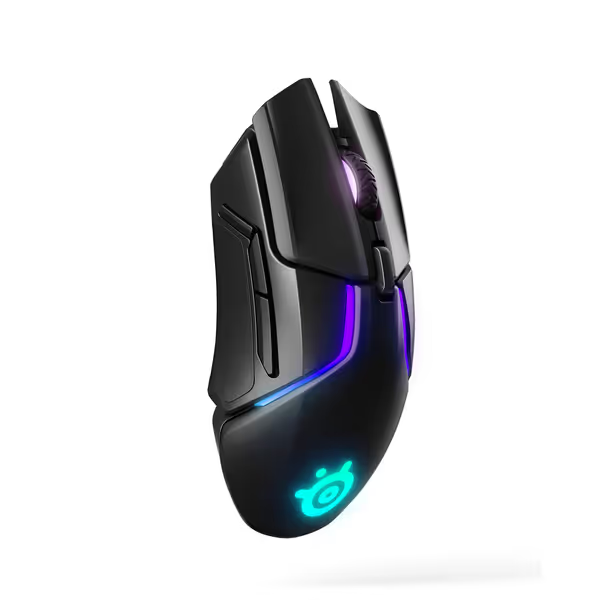
SteelSeries Rival 650 Quantum Wireless Gaming Mouse
Lag-free wireless gaming with custom weight and precision sensor.
$69.99
SensorTrueMove3+ Dual Sensor
SensorTrueMove3+ Dual Sensor
Pros
Lag-free Quantum Wireless performance.
Customizable 256 weight configurations.
Cons
Battery life inconsistent for some users.
Customers find this gaming mouse to be a great wireless device with a smooth, premium feel. The battery life receives mixed feedback - while it charges quickly, some report it lasts only about 2 days. Customers disagree on the functionality, with some reporting complete failure of the left click button. The weight adjustment feature and wireless connectivity are also mixed aspects, with some praising the included weights while others find it heavy, and some praising the wireless performance while others report constant disconnections. The glue strength is particularly concerning, with multiple customers reporting that the sticky rubber pieces are coming off.
Customers find this gaming mouse to be a great wireless device with a smooth, premium feel. The battery life receives mixed feedback - while it charges quickly, some report it lasts only about 2 days. Customers disagree on the functionality, with some reporting complete failure of the left click button. The weight adjustment feature and wireless connectivity are also mixed aspects, with some praising the included weights while others find it heavy, and some praising the wireless performance while others report constant disconnections. The glue strength is particularly concerning, with multiple customers reporting that the sticky rubber pieces are coming off.
When adjusting:
- Start with manufacturer's recommended setting for your use case
- Decrease LOD if you notice cursor drift during lifts
- Increase LOD if you experience tracking stutter on rough surfaces
Important: LOD adjustments work best when your mouse fits your hand properly. An ill-fitting shape creates inconsistent lifting patterns that no LOD setting can fully compensate for.
How Does Surface Choice Affect Lift-Off Distance?
Your mousepad's texture directly impacts effective LOD. For a deeper look at pad materials and textures, see our mouse pad surface tracking guide. On rough-textured pads:
- Sensor may "see" the surface inconsistently
- Creates false tracking starts/stops during lifts
- Effectively increases LOD due to texture interference
On glass surfaces (which some premium sensors track on):
- LOD measurements become less consistent
- Requires careful sensor calibration
This is why I recommend testing your gaming mouse lift-off settings on your actual daily-use surface, not a showroom desk. If you're choosing hardware for tricky surfaces like glass or fabric, compare mouse sensor types and surface performance.
What Other Factors Work Alongside Lift-Off Distance?
LOD doesn't exist in isolation. For true precision tracking, consider these interacting factors:
Landing Distance
Often overlooked, landing distance determines when tracking resumes as the mouse contacts the surface. Poorly calibrated landing distance causes cursor jumps when placing the mouse down, especially problematic for pixel-perfect work.
Surface Calibration
Most high-end mice include surface calibration routines that teach the sensor your specific mousepad's texture. This optimizes both lift-off and landing distances for your actual usage environment.
Polling Rate Impact
While often discussed separately, your polling rate affects how LOD issues manifest. At 1000 Hz, LOD inconsistencies appear as minor drift; at 125 Hz, they become pronounced jumps.
The Final Measurement
Understanding lift-off distance represents just one piece of the precision puzzle. As you optimize your setup, remember that physical fit comes first (fit unlocks performance) before any sensor parameter matters. Approach your mouse selection with measurement-led discipline: document your hand dimensions, identify your grip style, then fine-tune technical parameters like LOD to match your specific needs. When you solve for fit first, those subtle tracking improvements transform from theoretical advantages into tangible workflow gains.
Want to dive deeper into optimizing your entire input setup? Our anthropometric database offers free hand measurement guides and mouse compatibility scoring, because precision begins with proper measurement.
Related Articles